How to Connect UKG Pro to AD (Entra ID)? 5 Easy Steps to Follow
Chad Burggraf6 min read

For companies using the UKG Pro HR system, integrating with Microsoft Active Directory or Entra ID (formerly Azure AD) simplifies many tasks.
For one, it keeps a user’s AD account up-to-date when you update the UKG employee record. This reduces the need for manual data entry, which is time-consuming and expensive.
In this article, we’ll teach you how to integrate UKG Pro into traditional, on-premises AD and cloud-based Entra ID (Azure AD).
We’ll also explore the reasons for integrating these systems and the best practices to ensure a smooth process. But first, let’s look at what this connection entails.
What Is UKG Pro to AD Integration?
Integrating UKG into AD means connecting powerful platforms for real-time information sync.
UKG Pro is an extensive human capital management (HCM) solution designed to handle various aspects of the employee experience. These include payroll, talent acquisition, attendance, compliance, and performance management.
Meanwhile, Active Directory is an on-premise directory service developed by Microsoft. It helps IT managers organize and control user access across the organization’s network.
Entra ID, formerly known as Azure Active Directory, is a cloud-based tool that allows organizations to handle digital identities and their respective access rights.
In other words, both on-premise AD and cloud-based Entra ID centralize user authentication and security.
This integration allows IT teams to simplify user and access management. There’s no need for time-consuming and error-prone manual data entry.
How to Connect UKG Pro to Active Directory?
After learning the definition of integration, you’re probably curious about where to start. You can follow this step-by-step guide to connect UKG Pro to traditional Active Directory or cloud-based Entra ID successfully.
1. Plan the Integration Process
First, you need a solid integration plan. Assess your company’s specific integration requirements.
You should also gather all the necessary information, such as user credentials, domain details, and current configurations.
Don’t forget to involve key stakeholders during the planning stage to make sure everyone is on the same page.
2. Set Up UKG Pro
Next, configure UKG Pro for integration with Active Directory. Go to the settings and find the integration options.
Then, set up user synchronization and configure the settings according to your needs. For example, you can choose to keep a user’s email address synced every day or every week. Make sure you save these settings.
3. Configure Active Directory
Now, move on to Active Directory. Set up the necessary integration settings. Make sure the Active Directory user attributes align with those in UKG Pro to avoid any conflicts.
It’s also important to establish user provisioning and de-provisioning settings. This involves configuring the Active Directory manager to create, update, or disable a user account based on UKG Pro information.
For example, when new hires are added to UKG Pro, the integration can automatically create an Azure AD account and allocate computer resources in IT service management. Similarly, if employees are terminated in UKG Pro, their AD account is quickly disabled for smoother employee offboarding.
4. Establish the Connection
Once you have configured both systems, it’s time to establish the connection.
You can use middleware or integration tools to link UKG Pro and Microsoft AD. Look for a tool that offers a user-friendly interface, good customer support, automatic manager mapping, and scalability.
Regardless of your choice, you must follow the tool’s instructions carefully to ensure a smooth setup.
5. Test and Validate the Integration
After establishing the connection, you must thoroughly test it. Make sure data synchronization works as expected.
Test user provisioning and privileged access controls to ensure everything is functioning correctly. You should resolve any issues that arise during testing before going live.

Why Should You Integrate UKG Pro into AD?
Integrating UKG Pro with Active Directory can greatly improve your business processes. Here are some reasons why this integration is beneficial:
Streamline Employee Lifecycle Management
Employee lifecycle management can be challenging for many organizations. Imagine recruiting, onboarding, training, and offboarding employees manually. This involves constantly adding, updating, and removing user accounts.
Fortunately, you can automate user provisioning and de-provisioning by connecting UKG Pro to Active Directory or other directory services like Google Directory. Integration like this saves time and reduces mistakes related to manual processes.
Improve Security and Compliance
Security is always a top concern when managing employee information. Integrating UKG Pro with Azure AD offers better control over user access.
You can ensure that only authorized employees have access to sensitive information. For example, the HR team can see users’ email address accounts but shouldn’t access other assets like financial data. Thanks to this role-based access control, you can also ensure compliance with industry regulations.
Some third-party integration tools can also send custom email notifications when suspicious activities arise. These reminders can also serve as proof for onboarding cybersecurity compliance.
Reduce IT Workload and Costs
Another benefit of UKG Pro to Active Directory integration is reduced IT workload.
There’s no need for manual document scanning and data conversion. That’s because Active Directory can automatically sync information from UKG Pro. This integration can maintain fine-grained security groups and distribution lists based on the employee HR profile.
Since you can reduce manual data entry, you also save money. You don’t have to hire additional IT staff to manage the workload. You also avoid spending valuable time and resources fixing costly mistakes.
Enhance Data Accuracy
Integration ensures that changes in UKG Pro are reflected in AD and vice versa. This helps maintain data consistency across your enterprise systems.
Best Practices for UKG Pro to AD Integration
A seamless integration between UKG Pro and Active Directory automatically syncs and secures business data. To maintain a strong connection, you must follow the best practices below.
Update and Audit Regularly
It’s important to review and update your configurations to guarantee efficiency and security.
Besides regular updates, you should also audit UKG Pro and Active Directory every quarter. This helps you identify and resolve issues, such as security breaches, before they impact the integration.
Ensure Proper User Role Mapping
Mismatches in data mapping can result in incorrect usernames, security groups, or permissions.
Thoroughly assess the data fields in Active Directory. Make sure every piece of information matches the employee information in UKG Pro. Better yet, use automatic manager mapping to automate these tasks. You can save time and reduce costly errors.
Train IT Staff and End-Users
Training is integral to maintaining a strong connection between UKG Pro and Active Directory.
Provide regular training sessions with IT staff. You should also provide access to resources like webinars and industry conferences. Armed with new knowledge, your IT department can manage integration more effectively.
Seamless UKG Pro to AD (Entra ID) Integration with ezOnboard
Looking for a way to simplify UKG Pro to AD integration? Consider using ezOnboard to handle that integration.
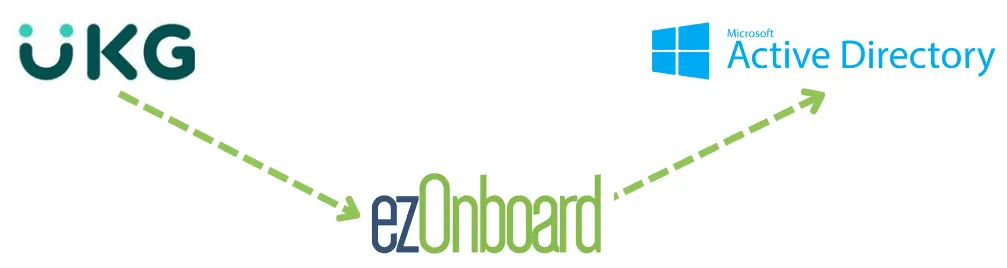
This automated solution seamlessly integrates an organization’s HR software (such as UKG Pro) with on-premise Active Directory and cloud-based Entra ID (Azure AD). Once connected, it automatically reflects approved HR system changes in AD by following pre-determined business rules.
With ezOnboard, you can automate user provisioning and deprovisioning, maintain data accuracy, and ensure secure connectivity between UKG and AD systems. Our AD and Entra ID integration guides cover the setup for other HR platforms.
To get started, request a demo or check the ROI calculator to see how much money ezOnboard can save you.
FAQs About UKG Pro to AD
What is UKG Pro?
UKG Pro is a human resource information system that helps companies manage employees effectively. It offers features like payroll management, time tracking, scheduling, and reporting.
UKG Pro also partners with other software and services providers to enhance how HR teams work. It supports integrations with apps like Deel HR and the Beekeeper Digital Workplace Platform.
What are the key benefits of integrating UKG Pro with AD?
Connecting UKG Pro to Active Directory (Entra ID) can simplify employee management by automating user provisioning and de-provisioning. HR managers and IT administrators can focus on more important tasks, which increases productivity and cost savings.
What are the integration requirements for connecting UKG Pro to AD?
Common integration requirements include username, password, email address, and API keys. You must prepare them in advance to ensure a successful UKG Pro to AD connection.