The Ultimate Guide to IT User Management
Chad Burggraf13 min read

Managing users across your IT environment is a tough job, especially when you have a growing team.
You’ll need to handle the IT onboarding process, provide access controls to systems, track user activities, and maintain compliance. It can feel like you’re constantly putting out fires.
Fortunately, when user management is done right, everything runs smoothly and efficiently.
In this guide, we’ll cover the basics of IT user management, from its definition to its importance. We’ll also share practical strategies to implement when managing user identities.
What Is IT User Management?
IT user management, or identity and access management (IAM), is the process of controlling who has access to what tools in your company’s modern IT environment.
It involves managing accounts, permissions, and roles to guarantee that each employee has the right level of access to do their job effectively.
Besides new hires, user management can also cover contractors, software vendors, and customers.
As an IT leader, your task goes beyond just handing out usernames and passwords. You should also manage user access to sensitive information, critical systems, and key resources.
This process includes setting up new accounts, modifying existing ones, authenticating users, and removing access during IT offboarding.
At its core, user management is about balancing convenience with security. You need to make sure all stakeholders can access what they need without compromising the safety of your systems.
When user management works well, it helps keep your business secure and your operations running smoothly.
Consequences of Poor IT User Management
Poor user management can have serious consequences that impact your entire organization. These may include the following:
Increased Security Vulnerabilities
One of the biggest risks of poor IT user management is security vulnerabilities.
When user accounts aren’t properly managed, it can lead to unauthorized access attempts to sensitive data.
This could be as simple as a former employee still accessing your systems or as complex as someone exploiting weak passwords.
Either way, these vulnerabilities make your business a target for cyberattacks.
Data breaches due to compromised user credentials can cost you a lot of money down the line. They may lead to increased work for your IT teams or, worse, compliance issues.
Operational Inefficiencies
An ineffective IT user management system can also slow down your entire operation.
Employees, customers, vendors, and other users might not have the access they need. This can lead to delays and frustration.
IT teams may need to constantly deal with access issues and onboarding tickets, which can distract them from doing other important tasks.
On the other hand, giving too much access can create confusion and errors. For example, new users may feel overwhelmed when they can browse a huge library of software solutions before finding the right tool for their jobs.
This inefficiency wastes time and resources, which can impact your team’s productivity.
Negative Impact on Employee Morale
Employees can get frustrated when they’re unable to do their jobs because of overlooked or incorrect access privileges.
Whether it’s waiting days for the right permissions or dealing with constant access denials, these issues can impact morale.
Employees want to do their work without unnecessary roadblocks. Poor IT account management only creates stress and dissatisfaction, which can lead to higher turnover rates.
Damage to Company Reputation
Ineffective IT user management can put your reputation at risk.
For example, when security breaches occur due to weak identity management practices, they can become a public issue.
Employees, customers, and vendors trust you to keep their information safe. A single breach can break that trust and result in lost business.
Besides security issues, inefficiencies caused by poor identity management can lead to missed deadlines and subpar service.
They further damage your reputation and show clients that you’re not committed to customer success.
Why Is Effective IT User Management Important?
Understanding the risks of poor user management makes it clear why doing it right is so important.
But if you’re still not convinced of its significance, here are the benefits of effective IT user management.
Protect Sensitive Data
Effective IT user management begins with protecting your most valuable asset—your data.
When you control who has secure access to sensitive information, you reduce the risk of data breaches.
Setting up strict permissions and secure authentication methods means only the right people can access certain files or systems.
By doing this, you’re not only securing your company’s systems and information. You’re also improving customer retention by keeping your clients’ and vendors’ data safe.
Boost Employee Productivity
When user management is done right, your employees can focus on their work instead of dealing with access issues.
Having the right tools and permissions from day one enables users to hit the ground running. It eliminates the delays and frustrations that come with waiting for account creation or dealing with incorrect permissions.
This efficiency boosts productivity across the board. Employees who don’t have to worry about technical issues are more engaged and can contribute more effectively to your company.
Improve End User Experience
In addition to employees, a solid identity management system also improves the experience for both internal and external users. These include vendors, contractors, and other departments.
When your team can access the right tools and information without delay, they’re better equipped to provide timely and accurate service.
Whether it’s responding to customer inquiries or managing access, improved user management empowers your team to deliver the best possible service. This leads to happier customers and stronger relationships.
Maintain Compliance
Compliance is non-negotiable if you want to run your business responsibly and ethically.
Fortunately, effective IT user management helps you meet industry standards and legal requirements.
It can monitor usage and manage resources such as confidential systems and data. It can also keep detailed records of user activity in a central directory service to help you prepare for audits.
Maintaining compliance protects your business from legal trouble. It also improves your credibility with clients and vendor partners.
Reduce Operational Costs
Improved IT identity management can save your business money in different ways.
First, meeting compliance requirements can prevent costly fines and penalties.
It can also simplify user access control and reduce the need for constant support from the IT team. This leads to lower operational costs.
Finally, when your systems are running securely, you can spend less time and money fixing problems. It translates to significant cost savings over time.

How to Improve IT User Management: 12 Effective Strategies to Implement
After learning why effective user management matters, it’s time to focus on the strategies that can improve how you oversee user identities. Below are the best practices you can implement:
1. Automate User Provisioning and Deprovisioning
Automation is among the most powerful tools at your disposal.
Automated user provisioning provides the correct authenticated access to systems and resources during onboarding.
Meanwhile, no-touch offboarding can automatically revoke user permissions when they leave or change roles within your company.
Both processes work together to improve IT user management. It can minimize human errors, reduce the risk of unauthorized access, and secure sensitive company data.
2. Implement Role-Based Access Control
You can use role-based access control to simplify user management across your IT infrastructure.
With role-based access control (RBAC), you can assign privileged access to roles rather than individual users. You can guarantee that only the right employees can access the resources needed for their specific job functions.
Setting up pre-defined roles also reduces the chances of unauthorized user access. This also makes it easier to manage permissions as employees constantly move within the company.
If you run a large enterprise where managing individual permissions is difficult, you are likely to see the immediate effects of implementing RBAC.
It’s a simple way to improve security and make sure access levels align with job responsibilities.
3. Enforce Strong Password Policies
Passwords are often the first line of defense in user management, so it’s important to enforce strong password-based authentication policies.
You can require stakeholders to use complex passwords and update them every year. Make sure they aren’t using the same password across multiple platforms.
By imposing strict password policies, you can protect your business against unauthorized access. You can also make it much harder for attackers to breach your systems.
4. Use Multi-Factor Authentication (MFA)
Sometimes, strong passwords aren’t enough to deter cyberattacks and data breaches. Consider adding an extra layer of security through multi-factor authentication systems.
Multi-factor authentication (MFA) requires users to verify their identity using two or more methods, such as a password or a fingerprint.
So, even if someone’s password is compromised, MFA provides an additional barrier that makes unauthorized access far less likely.
This will significantly minimize the risk of security incidents, making user management more secure and compliant.
5. Adopt Zero-Trust Security Principles
Implementing zero-trust security principles further protects your IT environment against unauthorized user access.
Zero-trust security operates on the idea that no user or device is inherently trusted. It requires validation for every access attempt, whether coming from employees or contractors.
To guarantee successful adoption, you can divide your network into smaller zones to limit access. Then, grant the least privilege necessary for users to perform their tasks. This reduces the attack surface and limits potential damage, even if an account is compromised.
6. Standardize Onboarding and Offboarding Processes
Inconsistent onboarding and offboarding can create security risks and operational inefficiencies. Without clear processes, users may start without the right tools or retain access long after they’ve left.
It’s important to standardize these workflows to improve IT user management and guarantee smooth transitions within your company.
Creating an onboarding checklist can help during integration. Include steps to provision accounts, assign roles, and grant access based on job requirements. Doing so can minimize manual errors and speed up the process.
For offboarding, you can establish strict timelines for deactivating user accounts and revoking access to all systems. This eliminates the risk of orphaned accounts, which are prime targets for attackers.
7. Monitor User Behavior
Keeping an eye on user activity is the key to spotting unusual or unauthorized actions before they become major problems.
You can use monitoring tools to track login attempts, access patterns, and changes in user behavior. This helps you identify potential security threats, such as a user accessing sensitive data they typically wouldn’t need for their job.
By staying vigilant and proactive, you can improve IT user management and maintain a secure environment.
8. Set Up Alerts for Suspicious Activities
In addition to regular monitoring, you can set up alerts to better manage users and security risks.
Configure your IT system to automatically notify you when there are unusual login attempts, access from unrecognized devices, or other red flags.
These alerts enable you to take immediate action, whether that’s investigating the activity or blocking access to prevent further issues.
Setting up alerts is a simple yet effective way to make sure that you’re always aware of what’s happening within your systems. It gives you peace of mind knowing that user management is under control.
9. Integrate User Management Software With Other Systems
Connecting user management software to other company systems can help you oversee digital identities from one platform. It minimizes the need to switch between different interfaces. It can also reduce manual data entry.
For example, integrating the tool with HR software allows automatic account provisioning when new employees are hired. Your IT team no longer needs to gather paperwork from the HR department. Details from new hires are automatically reflected in a user directory.
Meanwhile, linking to license management tools provides a unified view of software assets owned by your company.
This connection can also show who has access to software licenses. It helps you optimize usage and maintain compliance with vendor agreements.
10. Generate and Analyze Reports
Regular reporting can help you track user management activities and identify trends.
You can generate detailed reports on user access, permissions, and activity. Doing so gives you valuable insights into how stakeholders use your systems and access your company data.
Don’t forget to analyze these reports to spot patterns that could indicate potential security risks or inefficiencies.
For example, if you notice that a remote employee is accessing sensitive financial information from a coffee shop, you can require them to use a VPN. This encrypts data, which improves protection against cyberattacks and phishing attempts.
With detailed analytics, you can also identify areas for improvement in your user management strategy.
11. Train Your Employees
Your employees play an important role in IT user management, so regular training is essential.
Conduct regular training sessions that educate your employees on best security practices. These may include how to create strong passwords, recognize phishing attempts, and back up data.
When employees understand the risks and their role in protecting company data, they’re more likely to follow security protocols and report suspicious activity through user feedback.
12. Update User Management Policies
IT user management is not a set-it-and-forget-it task.
You should regularly update your user management policies so they remain relevant even when your organization grows or technology evolves.
Make sure they align with the latest security standards and best practices. This usually involves revising access levels, updating password requirements, and implementing new technologies into your processes.
When you keep your policies up to date, you can stay ahead of potential issues and evolving threats.
Tools for Automating User Management
As previously mentioned, automation is among the best ways to improve IT user management. The right tools can help your team oversee user accounts, access, and permissions with minimal human intervention.
Below are the solutions you can consider:
Identity and Access Management Platforms
IAM tools centralize user authentication and access. These platforms enforce security policies like single sign-on (SSO) and multi-factor authentication.
They also help manage permissions across systems, making it easy to control who can access what resources.
Self-Service Portals
Self-service account management solutions allow employees to handle common tasks like password resets or updating personal information. These portals free up IT teams from routine requests and improve efficiency.
Employees appreciate the convenience, while IT staff can focus on more critical tasks.
Password Management Solutions
Password management tools can help users securely store and manage their account credentials. They also alert individuals when they use weak or reused passwords.
These platforms even integrate with existing IT systems to guarantee seamless adoption.
Directory Services
Directory services, like Microsoft Active Directory, act as centralized repositories for managing user accounts and permissions. They allow IT teams to control access to resources based on roles and groups.
These services can also automate account provisioning and de-provisioning. Plus, they eliminate outdated or redundant accounts to strengthen your company’s security posture.
Future Trends in IT User Management
Even if you have the right tools, you’ll need to prepare for emerging trends in user management to stay ahead of future challenges. Let’s take a closer look below:
- AI for predictive user behavior analysis: Many businesses are starting to use artificial intelligence to identify patterns and anomalies in user behavior. AI reduces manual analysis, which can take a lot of time and resources.
- Passwordless authentication: As its name suggests, passwordless authentication doesn’t rely on traditional passwords. Instead, it uses tokens or device-based verification to speed up and secure logins.
- Biometrics: Biometric solutions, such as fingerprint and facial recognition, offer highly secure and convenient authentication. They are becoming more common in both enterprise and consumer applications.
- Orchestration in large-scale user access management: It involves coordinating policies and automating processes across multiple systems for better efficiency and control. Orchestration is useful for large organizations.
How Does ezOnboard Improve IT User Management?
ezOnboard is an onboarding solution that can automate key aspects of user management. It works by integrating your HR system with on-premises Active Directory and cloud-based Entra ID.
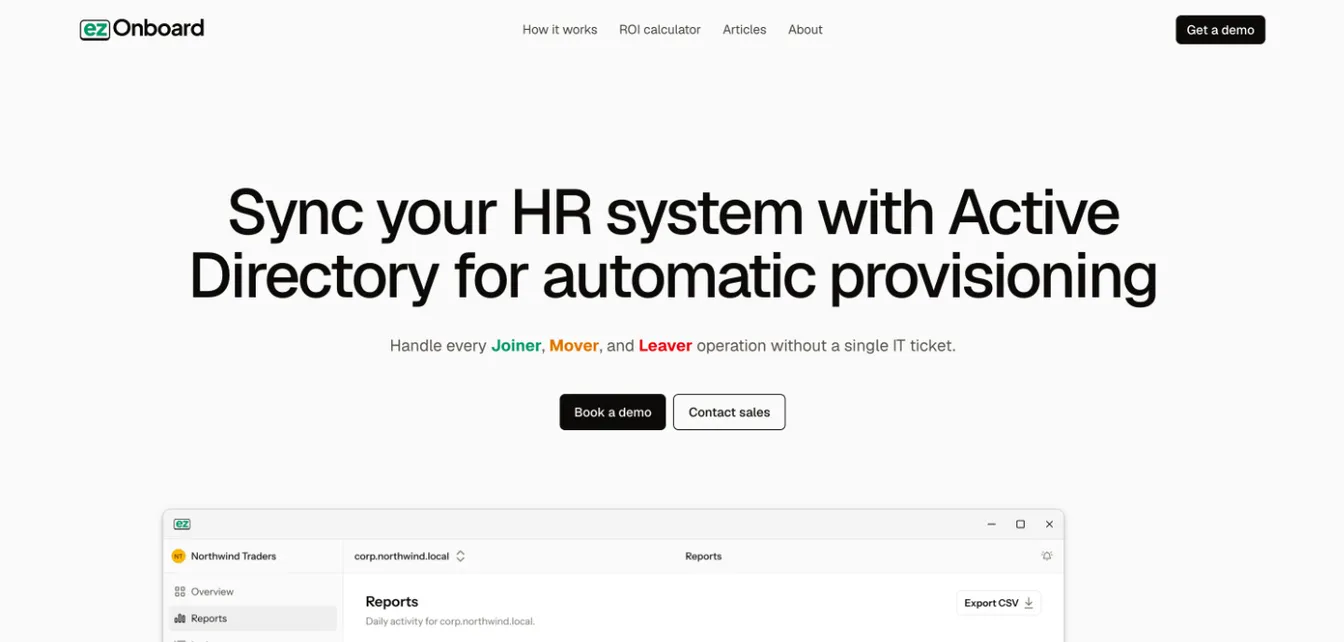
Here’s how ezOnboard can help you manage user identities:
- Automated user provisioning and deprovisioning: ezOnboard automates the entire lifecycle of user accounts, from welcoming new employees to removing access when they leave. This leads to faster onboarding and offboarding processes with minimal human intervention.
- Pre-defined access rules: The platform helps you grant correct permissions from day one using simple plug-and-play formulas.
- Seamless integrations: ezOnboard integrates directly with your HR software. Any changes in employee status are instantly reflected in Active Directory and Entra ID, which keeps everything accurate and in sync.
- Compliance and reporting: ezOnboard offers custom notifications and detailed reports. These provide full visibility into user management activities, making it easier to prove compliance during audits.
- Customized user management solution: Other tools for identity management are far too complex for most companies. They try to fit different features into one platform, which can overwhelm teams. ezOnboard is a custom solution for your business that is easy to use and affordable to deploy.
Successful IT User Management With ezOnboard
You can achieve better IT user management with ezOnboard. This software solution gives you complete visibility and control over Active Directory and Entra ID changes.
ezOnboard can also automate onboarding and offboarding processes. This makes it easier to manage users and their permissions from the moment they enter your company until they leave.
Request a demo to get started today! Or check out their ROI calculator to see how much money ezOnboard can save you.
FAQs About IT User Management
What is user management in IT?
IT user management refers to the process of creating, maintaining, and monitoring user accounts within an organization’s technical infrastructure. IT teams should assign roles, grant access to resources, and revoke permissions when necessary.
What is an example of a user management system?
Microsoft Active Directory is a widely used user management system for managing user accounts, permissions, and access across enterprise networks. It can seamlessly integrate with HR software solutions using ezOnboard.
This integration automates account creation, user administration, access management, and other repetitive tasks.
What is user role management?
User role management is the process of assigning and controlling access rights based on defined roles. This ensures users have appropriate permissions to perform their jobs.
What is a user manager?
A user manager refers to an IT administrator responsible for creating, modifying, and managing user accounts and their access within a company system.